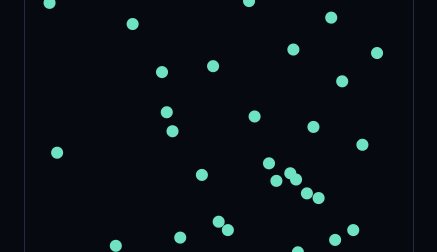
Gauge is a daily browser game about estimating without a marked ruler, protractor or stopwatch. You see a brief cloud of dots, choose a fill level, set an angle, hold for a duration and match a line length. Each task asks for a different kind of judgment. Finishing all five gives you an accuracy score and shows whether you tend to undershoot or overshoot individual targets.
How to play Gauge
Start a round from its ready screen. Drag to change your estimate when the game presents a number, a glass, a dial or a line, and use Lock In to submit. For Hold, press and keep the pointer or finger down. The round takes your release as the answer. Read the requested angle, amount or time before you start adjusting.
Gauge tips
For Count, try splitting the cloud into rough groups in the moment it appears. If three clusters look like four, five and four dots, a working estimate of thirteen is faster to recover than the order you saw them. In Pour, put mental marks at one-quarter, halfway and three-quarters and use the closest mark as your starting point. Leave a little room for a final adjustment before committing.
In Angle, the direction convention matters. Zero points right, ninety degrees points up and one hundred eighty points left. For 135°, picture halfway between straight up and left. For a smaller angle that sits near the rightward baseline, build up from an easy fraction of ninety.
For Hold, choose a steady mental beat before you press. The pressing and releasing gestures can distract from the interval, especially on shorter targets. In Length, compare the two endpoints along the full segment. A diagonal can look short if you measure its horizontal projection alone. Picture rotating the example line until it shares your answer line’s direction, keeping its ends the same distance apart.
Use the reveal to calibrate
Read both the target and the error after each round. For a 65% pour, an answer of 58% tells you that your halfway reference was fine but your step above it was small. In Angle, an answer that consistently lands near 90° may mean you are adjusting too cautiously away from the vertical. These are useful observations even if the next daily presents a different value.
Hold has a different kind of feedback. Try counting regular beats from the moment the press begins and release on the last beat. If you count too quickly, your answer will come out short despite reaching the intended number in your head. A practice round can help distinguish an early start from a fast count. In the final task, make the longest and shortest stretches you would still believe match, then take their midpoint as your first estimate. Narrow that range with small drags until the two lines feel comparable.